
FREE FAX App Send Fax, Receive
Amplify·Business
4.0436.00 Reviews
- Version
- 1.4.2
- Installs
- 100.00K
- Age Rating
- Everyone
Screenshots
Our Review of FREE FAX App Send Fax, Receive
 Analysis by Appyee
Faxing from a phone is useful precisely because it is still an occasional requirement: a form, signed page, or business document may need to reach a fax number even when there is no machine nearby. FREE FAX App Send Fax, Receive is an Android business app from Amplify· that brings sending and receiving into a mobile workflow. I see its appeal less as a replacement for every office fax setup and more as a way to handle those inconvenient one-off jobs without rearranging the day around a printer or copy shop.
A phone-based option for the occasional fax
The app is free to install, is rated for Everyone, and has a 4.0 average from around 1.4K ratings. It has passed 50K installs, which gives a prospective user some context for its reach without telling the whole story about whether it suits a particular workflow. The key question is practical: do you need to send or receive faxes often enough to value a dedicated service, but not so often that you already rely on a full office system?
For someone who faxes only now and then, a mobile app can remove several small hassles. You can prepare a document where you are, enter the destination, and keep an eye on the job rather than finding a machine and handling paper copies. Receiving matters too: it can make a phone-based setup more useful than a send-only tool, especially if a client, office, or institution may reply by fax.
Getting Started with Ease
First things first, setting up the FREE FAX App Send Fax, Receive is a breeze. I downloaded it on a lazy Sunday afternoon, hoping for a hassle-free setup, and that's exactly what I got. The user interface is straightforward and intuitive, so even if you're someone who's not particularly tech-savvy, you'll find this app incredibly user-friendly.
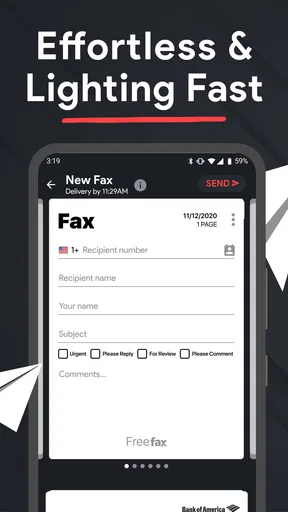
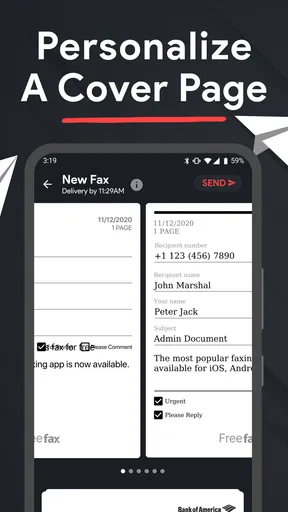
Once you open the app, it prompts you to create an account or log in if you already have one. I went through the sign-up process, and within minutes, I was ready to send my first fax. It's really as simple as uploading your document, entering the recipient's number, and hitting send. Easy peasy!
Preparing documents before you send
The smoothest experience starts before you reach the send button. If you are photographing a paper page, place it on a flat, contrasting surface and check that all four edges and any small print are legible. A fax is only useful if the recipient can read it, and a quick review of the image on your phone can prevent a second attempt. For a multi-page form, keep pages in the right order and look through the assembled document before sending.
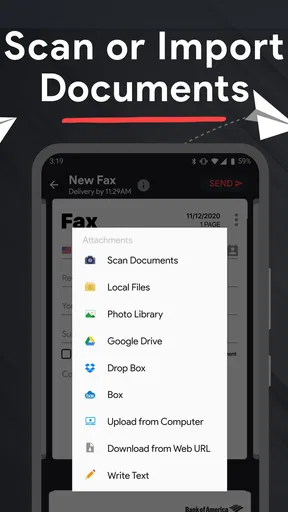
That preparation also helps when the source is already digital. The review experience described here includes PDFs, DOCs, and gallery images, which covers common personal and small-business paperwork. If a document contains several pages, use a single, clearly ordered file where possible rather than treating each page as a separate job. This makes it easier to check what you are sending and reduces the chance of omitting a page.
Features That Make Life Simpler
The features are where the app truly shines. Not only can you send faxes, but you can also receive them. I tested this out by having a friend fax me a document. The notification popped up almost instantly, and I could view the fax right in the app. No need to rush to a fax machine or printer—it’s all accessible from your phone.
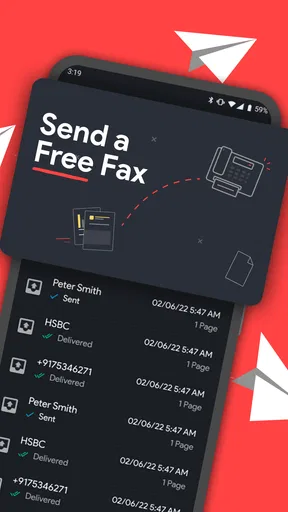
Another neat feature is the ability to send faxes to international numbers. So, if your business or personal life requires you to communicate overseas, this app has got you covered. Plus, there’s a handy history section where you can track all your sent and received faxes. No more wondering if your document went through; you can check the status anytime.
A realistic use case: handling a form away from the office
Imagine you are away from home when a provider asks for a signed page to be faxed back that day. You can sign the paper, take a careful photo, inspect the crop, and send it from your phone instead of searching for a nearby fax machine. Afterward, checking the history gives you a place to review the job status. If the other party says it has not arrived, you have a useful starting point for checking whether the transmission completed before deciding what to do next.
Receiving can help in a similar situation, but it is worth thinking ahead: someone sending you a fax needs a way to address it to you. If you expect an incoming document, make sure you understand the app’s receiving setup and share the relevant details with the sender before they transmit anything. That small bit of coordination is easy to overlook when you are used to receiving paper at a shared office machine.
Choosing between a fax app and the usual alternatives
Compared with a physical fax machine, a phone-based service is more convenient when you are away from a fixed office and do not need to manage a steady stream of paper. It also avoids the need to scan a page on a separate device if a legible phone image will do. On the other hand, an office machine or established business fax system may be the better fit for repeated team use, shared records, or a workflow where several people need access.
Email is often simpler for ordinary document exchange, and a secure document portal may be preferable when the recipient provides one. Fax remains relevant when an organization specifically asks for it, so I would not use a fax app merely because a document is ready to send. My rule of thumb is to follow the recipient’s accepted method: use this app when a fax number is required, and choose a direct digital channel when that is clearly supported and more convenient.
Costs, frequency, and the right expectations
The app is free to download, but it also offers in-app purchases ranging from $0.99 to $369.99 per item. That wide range makes it sensible to check the exact purchase and what it covers before confirming anything, especially if you expect more than an occasional fax. A free download should not be taken to mean that every volume or feature is free. If a document is urgent, check the cost shown for the specific action rather than discovering a charge midway through a busy task.
This is likely to suit someone who values having fax capability available for rare paperwork. A person sending documents every week, handling many pages, or needing predictable costs for a team should compare the app’s purchase options with a dedicated fax service before relying on it. The practical trade-off is convenience on demand versus the cost and structure that can come with frequent use.
Why Should You Download It?
Now, why should you choose this app over others? For starters, it's free. Yes, you heard that right. While there might be fees for premium features or high-volume faxing, the basic functionality doesn’t cost a dime. This is perfect if you’re an occasional fax sender who doesn’t want to invest in a full-fledged fax service.
Moreover, the app supports a variety of file formats, including PDFs, DOCs, and even images from your gallery. I found this particularly useful when I needed to fax a signed contract. I simply snapped a picture, uploaded it, and sent it off. The app even provides editing tools to crop or enhance your images, ensuring your faxes are clear and professional.
Who will appreciate it—and who may be better served elsewhere
I would consider it for personal paperwork, a solo business, or travel situations where a fax request is unusual but cannot be ignored. The combination of sending, receiving, and a history view is more useful than a one-way emergency tool because it gives you a way to handle both sides of a short exchange. It can also be handy for someone who does not want to keep a scanner or fax machine at home just for occasional forms.
I would look elsewhere if faxing is a routine part of a larger office process. A team may need shared access, consistent billing, retention practices, or a centrally managed number, and those needs are different from sending a document from one phone. I would also pause before using any mobile fax workflow for highly sensitive paperwork until I had checked the app’s current privacy and handling details for myself; the fact that a tool is convenient is not, on its own, a reason to send every kind of document through it.
Keeping a sent fax easy to verify
A useful habit is to confirm the destination number before sending, particularly when copying it from a message or handwritten note. Faxing the wrong number can expose a document to an unintended recipient, and a successful transmission status would not correct that mistake. I would also keep the original file until the recipient confirms they can read it, especially for forms where a faint signature or clipped line could force a repeat.
The history section is valuable for checking what happened, but it is not a substitute for the recipient’s confirmation when the document matters. For deadlines, I would send with enough time to handle a busy line or an unreadable page, then contact the recipient through an appropriate channel if delivery is disputed. That modest buffer is a better plan than assuming a phone notification alone settles every question about whether paperwork has been accepted.
Security and Reliability
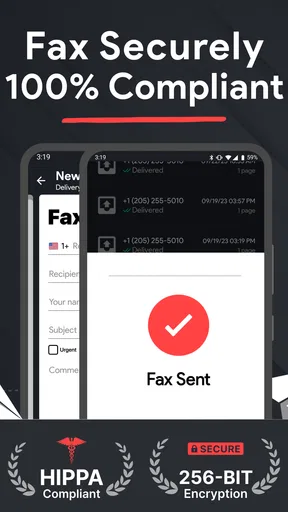
In today’s world, security is a big deal, especially when dealing with sensitive documents. The app uses encryption to protect your data, giving you peace of mind that your information is secure. During my testing, I never encountered any reliability issues. Every fax I sent was delivered promptly, and I didn’t experience any app crashes or glitches.
This reliability extends to the customer support offered by the app. I had a minor query and reached out through their support chat. The response was quick and helpful, which is always a plus in my book.
What the current version tells me—and what I would watch for
The app is currently at version 1.3.8 and was released on Oct 9, 2022. Those facts give a useful snapshot of its product history, but they do not by themselves establish how frequently it has changed or what any particular release improved. I would treat the current version as the one to evaluate on the device I plan to use, rather than assuming an older experience or a future change will match it.
For existing users, the sensible approach is to check that the app remains compatible with their phone and to review the purchase details before changing how often they use it. Its minimum operating-system requirement is Android 10, so a device running an earlier version is not a suitable starting point. Beyond compatibility, what I would watch is whether the app continues to make incoming faxes and transmission history easy to manage, since those are the parts that turn a one-off sender into a more complete mobile option.
Final Thoughts
So, is the FREE FAX App Send Fax, Receive worth downloading? Absolutely. It's a handy tool for anyone who needs to send or receive faxes without the hassle of traditional fax machines. Its ease of use, combined with its robust features and reliability, make it a standout choice in the app store.
Whether you’re a busy professional, a small business owner, or just someone who occasionally needs to send a fax, give this app a try. It’s free, efficient, and might just save you a trip to the office supply store. Go ahead, download it, and keep the power of faxing at your fingertips.
Verdict
Strengths of FREE FAX App Send Fax, Receive
- Easy to use interface for quick faxing.
- Supports multiple document formats.
- Cloud storage integration available.
- No subscription fees for basic use.
- Secure encryption for data protection.
Limitations of FREE FAX App Send Fax, Receive
- Ads can be intrusive at times.
- Limited free pages per month.
- Occasional delays in sending faxes.
- Some features require in-app purchases.
- Requires stable internet connection.
Other Releases by Amplify·
View All
Fill and Sign Easy PDF Editor
Business4.4
Similar Picks in This Category
View All
LinkedIn: Community & Network
LinkedIn3.8

Zoom Workplace
zoom.com4.1

Microsoft Teams
Microsoft Corporation4.6

Meta Business Suite
Meta Platforms, Inc.4.6

Webex Meetings
Cisco Systems, Inc.4.5

TeamViewer Remote Control
TeamViewer4.4
Frequently Asked Questions
What features does the FREE FAX App offer for sending and receiving faxes?
The FREE FAX App allows users to send and receive faxes directly from their smartphones. Users can upload documents from their device, cloud storage, or capture them using their phone's camera. The app supports multiple file formats and offers a simple, intuitive interface for efficient fax management.
Is there a limit to the number of faxes I can send or receive with the FREE FAX App?
The FREE FAX App typically offers a limited number of free faxes per month. For users who need to send or receive more faxes, there are various subscription options available. These plans provide flexibility and are designed to accommodate different levels of faxing needs.
How secure is the FREE FAX App for sending confidential documents?
Security is a priority for the FREE FAX App. It uses encryption protocols to ensure that your documents are transmitted safely. Additionally, the app complies with industry standards for data protection, ensuring that sensitive information remains confidential during transmission and storage.
Can the FREE FAX App be used internationally?
Yes, the FREE FAX App supports international faxing. Users can send faxes to a variety of countries, although international rates may apply depending on the subscription plan. It's important to check the app's terms and conditions for any specific details regarding international service.
What customer support options are available for the FREE FAX App?
The FREE FAX App offers customer support through various channels. Users can typically access a help center with articles and FAQs, or contact support directly via email or in-app chat. The support team is available to assist with any technical issues or questions regarding app features and billing.
